


Automotive After Sales Service Dashboard Indicators
Discover the key automotive after-sales service dashboard indicators in SidarSoft. From vehicle history tracking to warranty management and customer satisfaction; read this to optimize your business performance.
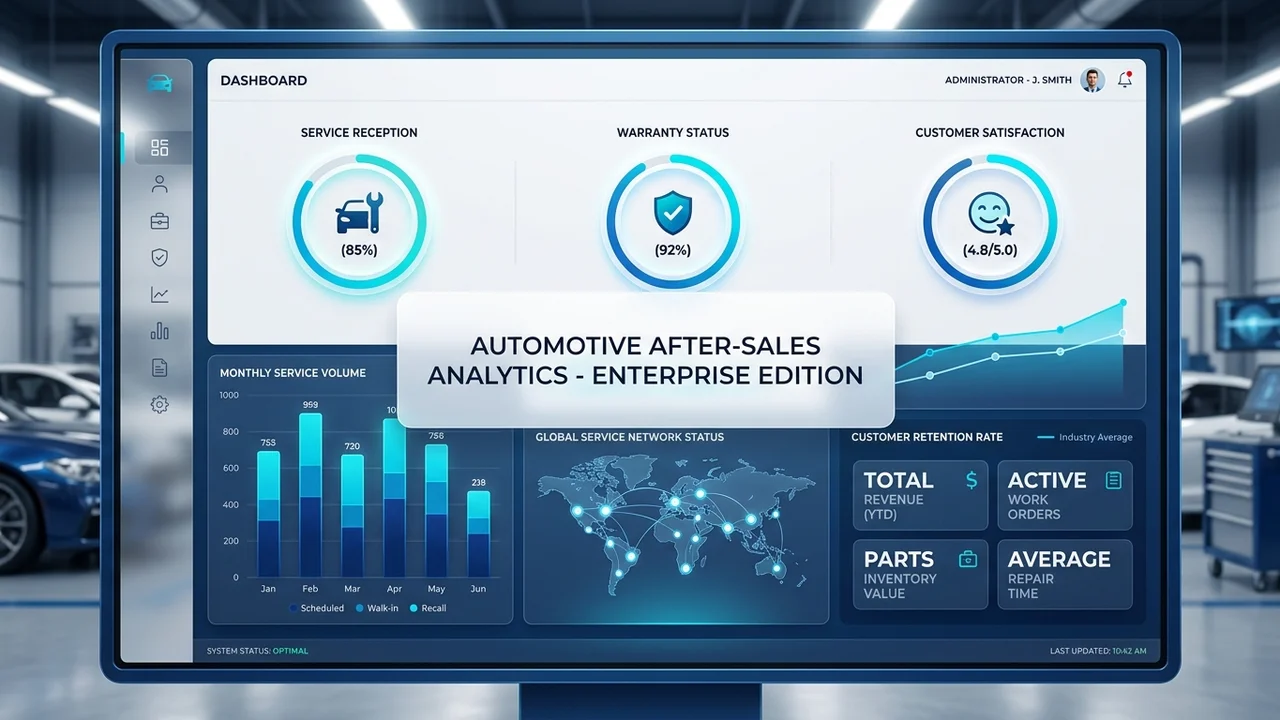
After-Sales Service Dashboard Indicators in SidarSoft
In today's competitive market, simply providing services is not enough; what drives real business growth is the ability to accurately analyze performance and make rapid decisions based on real data. Therefore, management dashboards in the field of after-sales service have become one of the most important tools for controlling, evaluating, and improving processes. In companies active in the automotive industry, from dealerships to specialized maintenance centers, access to real-time and accurate information can significantly increase service quality, customer satisfaction, and profitability.
SidarSoft, with its specialized experience in designing enterprise software, provides professional information dashboards in all parts of its software. In the field of after-sales service, this capability has been developed in a particularly specialized and practical way. These dashboards help managers view and analyze reception status, guarantee, warranty, parts, labor, finance, vehicle history, and customer satisfaction in an integrated manner.
Why is a Dashboard Important in Automotive After-Sales Service?
In the after-sales service sector, the volume of information is extremely high. From the moment a vehicle enters the repair shop or dealership to warranty checks, parts allocation, labor calculation, invoice issuance, service history recording, and receiving customer feedback, everything must be accurate, fast, and traceable. Without a professional dashboard, this information becomes scattered, making managerial decision-making difficult.
SidarSoft dashboards solve this problem. Using after-sales service dashboards, managers can identify the strengths and weaknesses of their organization, spot operational bottlenecks, and make more precise decisions to improve performance.
Sidar After-Sales Service Dashboard Indicators
What follows are the most important indicators that can be defined, viewed, and analyzed in the after-sales service dashboard in SidarSoft. These indicators are designed to be fully practical for both executive and operational managers.
1. Number of Receptions
One of the most fundamental indicators in after-sales service is the number of vehicle receptions. In the SidarSoft dashboard, this information is available categorized by branch, service advisor, and vehicle type, which helps in resource planning.
2. Guarantee
Checking the number of guarantee files, related costs, and the status of requests is essential for quality control. SidarSoft enables you to accurately analyze guarantee usage trends.
3. Warranty
The warranty dashboard in SidarSoft shows you which services were performed under warranty and the trends in warranty claims, helping to optimize support processes.
4. Parts and Labor
In the SidarSoft dashboard, you can accurately monitor parts consumption, high-use parts, and labor costs. These indicators are vital for inventory management and preventing resource waste.
5. Finance and Accounting
SidarSoft's financial dashboards integrate information such as total service revenue, customer balances, and service profitability to ensure more accurate financial decision-making.
6. Vehicle History Tracking
This feature stores all vehicle service records, including repairs, inspections, and parts replacements. This information is essential for future diagnoses and resale value, and it is easily traceable in SidarSoft.
7. Customer Feedback and Satisfaction
SidarSoft displays indicators related to customer satisfaction scores, complaints, and response times, allowing managers to assess service quality from the customer's perspective.
8. Mobile App Integration
With mobile connectivity in SidarSoft, managers and customers can track file status and service history instantly and from anywhere.
9. Vehicle Downtime and Service Duration
SidarSoft dashboards calculate the time a vehicle stays in the service center from reception to delivery, helping to identify bottlenecks and increase service speed.
10. Technician and Staff Productivity
This indicator analyzes the performance of each technician, the average service completion time, and the rework rate to ensure more efficient human resource management.
11. Periodic Service Reminders
Using SidarSoft tools, periodic service times are managed, and by reminding customers, the customer retention rate is increased.
Software Customization Based on Each Organization's Needs
One of the key advantages of SidarSoft is that the after-sales service software can be customized to suit the needs of each business. Since the needs of dealerships and service centers differ, SidarSoft provides the ability to configure dashboards, forms, and key indicators based on the actual priorities of each organization.
Conclusion
If you are looking for an accurate, professional, and scalable solution to manage after-sales service, SidarSoft can cover all your needs within a complete software platform. These dashboards provide deep and professional managerial insight for your organization.
Learn More About the After-Sales Service Module
To learn more about the features and capabilities of after-sales service in SidarSoft, you can visit the dedicated page for this module.



Frequently Asked Questions
Why is using a dashboard in after-sales service essential?
Using a dashboard in SidarSoft helps managers make decisions based on real-time data rather than guesswork, identify operational bottlenecks, and reduce costs.
Is it possible to track the full vehicle history in this dashboard?
Yes, one of the key indicators in SidarSoft is tracking the complete vehicle history, including repairs, services, and parts replacements, which is vital for resale valuation.
Can the dashboard indicators be customized?
Absolutely; SidarSoft allows for full customization of forms, dashboards, and key reports based on the priorities of each specific organization.
How does the after-sales service dashboard help with financial management?
By integrating the service department with accounting, this dashboard automatically calculates and displays revenue, service profitability, and labor and parts costs.
What is the role of the dashboard in increasing customer satisfaction?
By recording and analyzing complaints, feedback, and vehicle delivery times, this dashboard helps managers identify weaknesses in the customer experience and resolve them promptly.